
THE EVERYDAY ARROW SYSTEM
Plan the Right Hunting Arrow for Your Bow
Arrow weight, trajectory, components, FOC, and spine affect one another. The Everyday Arrow Planner keeps those decisions connected around your bow and the distances you expect to hunt.
If those terms are new, that is fine. Trajectory is the arrow’s path, FOC describes where the arrow balances, and spine describes how stiff the shaft is. The Planner walks through them in order.
You do not need an account to begin. You can decide whether to save the plan permanently after you start.
Build the Arrow Around the Hunt
Many arrow recommendations begin with one total weight or one shaft-spine number. That may give you a starting point, but it does not show what happens to the rest of the arrow when one part changes.
The Planner starts with your bow and the way you hunt. It then carries each decision into the next one, so you can see the tradeoffs before buying or cutting a full batch of arrows.
1. Heavy Enough Without Guessing
More arrow weight can help the arrow keep moving after impact and may quiet the bow. It also slows the arrow and creates more drop as distance increases.
The Planner compares those tradeoffs using your bow and hunting distances instead of treating one grain number as the answer for every hunter.
2. A Trajectory You Can Actually Use
A heavier arrow does not automatically create an unusable path. Bow speed, the distance where your sight is zeroed, your Normal Hunting Distance, and the amount of rise or drop you will accept determine the practical result.
The Planner shows what the modeled path does. It does not force you to abandon a 20-yard zero or another sight plan that works for the way you hunt.
3. Components That Work as One Build
Reaching a target weight is not enough. The shaft and every part attached to it still need to fit together.
They must also produce a useful balance point and the right shaft-stiffness class. The Planner calls these results planned FOC and Correct Spine Class.
The Planner keeps the complete component plan connected instead of treating each part as a separate purchase.
4. A Starting Point You Can Verify
The Planner creates a focused parts-and-measurement plan. It does not prove how the completed arrow will leave your bow.
Build one complete test arrow and verify it with your bow before completing the batch.
Why Trust the Trajectory Estimate?
The refined trajectory model was built from controlled radar data published by Precision Cut Archery and used with permission. It was then checked without refitting against 28 new arrow configurations from the 2026 study.
In the locked Advanced reference profile, a 508.2-grain arrow launched at 238.2 fps modeled 222.6 fps at 40 yards and 215.1 fps at 60 yards. Those are release-check outputs used to make sure the Planner and the dedicated Trajectory Calculator return the same result from the same arrow facts.
The independent 2026 check is the stronger accuracy test. On the 28 new configurations, the average difference was 0.86 fps at 30 yards and 1.32 fps at 60 yards. Nine out of ten 60-yard results were within 2.30 fps in the controlled indoor study.
That does not turn a model into a sight tape. It gives the Planner a measured foundation for comparing arrow setups, while your finished arrow and real sight marks remain the final proof.
- Read the published 2026 drag method
- See the 2026 radar-speed summary
- Review the 2026 arrow-build details
The Planner uses the refined model when the exact shaft, vane, fletching, and point-profile facts are available. When they are not, it uses the dependable Standard estimate instead of guessing.
Five Connected Decisions
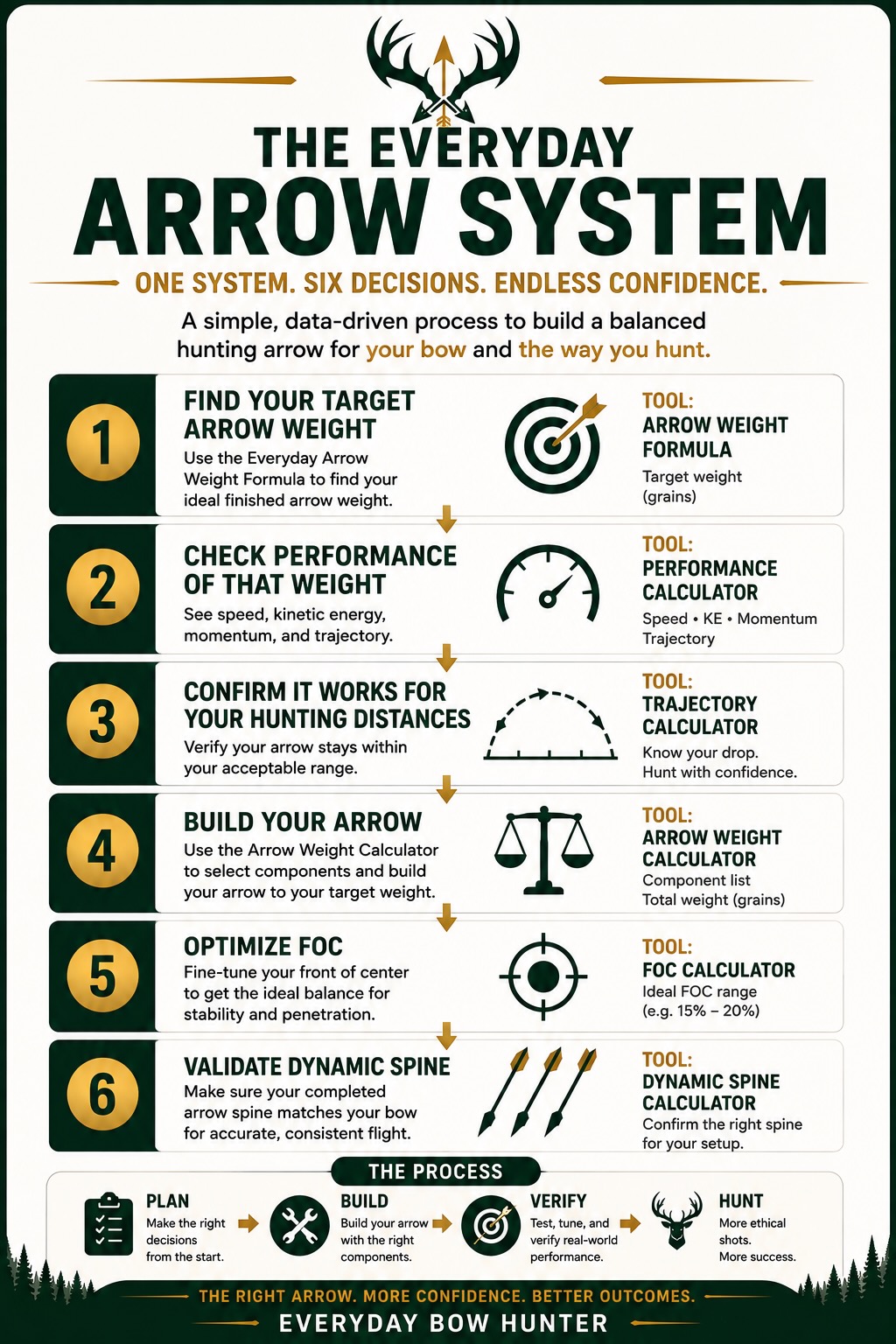
The Planner follows the same decision order used throughout the Everyday Arrow System. You do not need to understand every calculation before beginning.
Start at the first step and use the explanation beside each result. A change made early in the plan can affect the results that follow.
1. Target Weight & Performance
Enter your bow and hunting facts, choose a safe starting arrow length, and set a working finished weight. The Planner then compares speed, energy in motion, and the arrow’s tendency to keep moving.
2. Trajectory
Choose the distance where the sight is zeroed and how far above or below the aiming line you are willing to study. The Planner shows the modeled center-hold range and the arrow’s position at your Normal Hunting Distance.
3. Components
Select a reviewed complete package or enter your own shaft and parts. The Planner tracks finished weight, known part fit, balance, and shaft stiffness as the build changes.
4. FOC
FOC means front of center. It shows how far the arrow’s balance point sits in front of the middle of the arrow.
Review the planned FOC, then compare meaningful component changes. The completed test arrow must still be measured to find its real balance point.
5. Dynamic Spine
Dynamic Spine is the Planner’s estimate of how stiff the shaft acts with your bow, arrow length, and total front weight. Check the recommended manufacturer class after those facts are known, then compare it with the current shaft-maker chart and real tuning.
Two Valid Ways to Build
You can ask the Planner to help assemble a reviewed component package, or you can enter the components you already own or intend to use. Both paths use the same connected calculations.
Help Me Build My Arrow
The Planner shows reviewed complete component packages that fit the available technical information. Each package explains its intended strength, finished weight compared with your target, planned FOC, Correct Spine Class, and known component fit.
When a Value Option is available, it appears after the closer technical and weight matches. Affiliate availability does not decide which package is technically eligible.
Build With My Own Components
Use the custom path when you own the parts, know the setup you want, or need to model a component that is not in the reviewed catalog. You can also begin with a recommendation and then replace individual values with your own choices.
You can move between recommendation and custom exploration. Looking at another option does not silently replace the working build. Confirm This Build establishes the component plan that continues into final review and saving.
What You Need Before Starting
Bring the best information you have. You can return and correct a value later, so do not let one unknown number stop you from learning how the Planner works.
- Published IBO or ATA speed from the bow maker
- Actual peak draw weight measured on the bow
- Actual draw length that fits you
- Normal Hunting Distance
- Maximum Shot Distance
- Bow maker’s minimum finished-arrow weight
- Known shaft and component information if you plan to use a custom build
What the Result Means
The Planner provides a connected estimate based on the information entered. Think of it as a detailed build sheet that helps narrow the choices before you spend money or build a full batch.
Before completing the batch:
- confirm the current bow and shaft-maker guidance;
- build one safe, complete test arrow;
- measure its actual finished weight, balance point, and FOC;
- paper tune and broadhead tune;
- verify clearance, sight marks, trajectory, and flight with your bow; and
- revise the plan if the completed arrow does not match the estimate or tune correctly.
Start Now, Save When Ready
You can begin as a guest. An unfinished local draft can be continued in the same browser as long as that browser’s saved site data remains available.
Create or use an account when you want to keep a plan in your Gear Locker. The Gear Locker is your private area for saved drafts and completed planning records.
Signed-in hunters can return to those builds later and download the confirmed build PDF as a printable parts-and-measurement reference when available.
Clearing cookies or site data, using private browsing, changing browsers, or changing devices can remove access to a guest draft. A Gear Locker record is the dependable choice for work you want to keep.
Continue Through the Arrow System
The Planner is one part of a larger process. Use these resources when you need the reasoning behind a decision or the next verification step.
Everyday Arrow System
See how target weight, performance, components, FOC, spine, tuning, and verification fit into one complete system.
How to Build a High-Performance Hunting Arrow
Learn the planning and verification process that evolved into the connected Planner.
How to Use the Everyday Arrow Planner
Follow the beginner instructions for the recommended and custom component paths.
All Calculators and Planning Tools
Use the standalone calculators when you want to study one decision, compare an existing arrow, or work through the process manually.
Coming Later: The Arrow Planner Bench Guide
This separate guide will cover the detailed shop process for turning a confirmed plan into one complete test arrow, measuring and tuning it, and then completing the batch.
Final Action
Build One Arrow Before You Build the Batch
Use the Planner to create a focused starting build, then prove it with one complete arrow, real measurements, and tuning.