
FOC, or front of center, is one of those arrow-building numbers that is easy to check too late. I have done it myself: choose the shaft, install the front components, fletch the arrow, and then measure the balance point. By then, most of the choices that control FOC have already been made.
That is why I use this Arrow FOC Calculator twice in the Everyday Arrow System. First, I use planning mode to estimate FOC and set a working target while choosing the shaft and components. Then I use measuring mode on a completed test arrow to confirm the finished build.
The tool handles both jobs without making you jump between calculators. Planning mode estimates finished weight, balance point, and FOC, solves for a target FOC, and compares nearby front-weight options. Measuring mode calculates FOC from a physical arrow’s balance point. Use the estimate to guide the build, then measure one completed test arrow before finishing the full batch.
Measure or Estimate Your Arrow FOC
Choose the mode that matches where you are in the build:
- Measure an Arrow I Already Have: Enter the correct arrow length and the physical balance point.
- Plan an Arrow Before I Build It: Enter the shaft and component specifications to estimate finished weight, balance point, and FOC before assembly.
The result updates automatically. Planning mode can also solve for a target FOC and compare nearby front-weight options. If you use a half-out or outsert, enter how far it sticks out past the front of the shaft in the separate field. If the insert sits flush with the shaft, leave that field at zero.
Want to Build the Whole Arrow in One Place?
If you want the guided path, the Hunting Arrow Planner walks you through arrow length, target weight, performance, components, FOC, and dynamic spine in one connected build.
How to Measure a Half-Out or Outsert
Arrow length runs from the groove in the nock, where the string sits, to the front end of the shaft. A half-out or outsert may stick out past that front end. Do not add the extra distance to arrow length or cut-shaft length. Enter it in its own field.
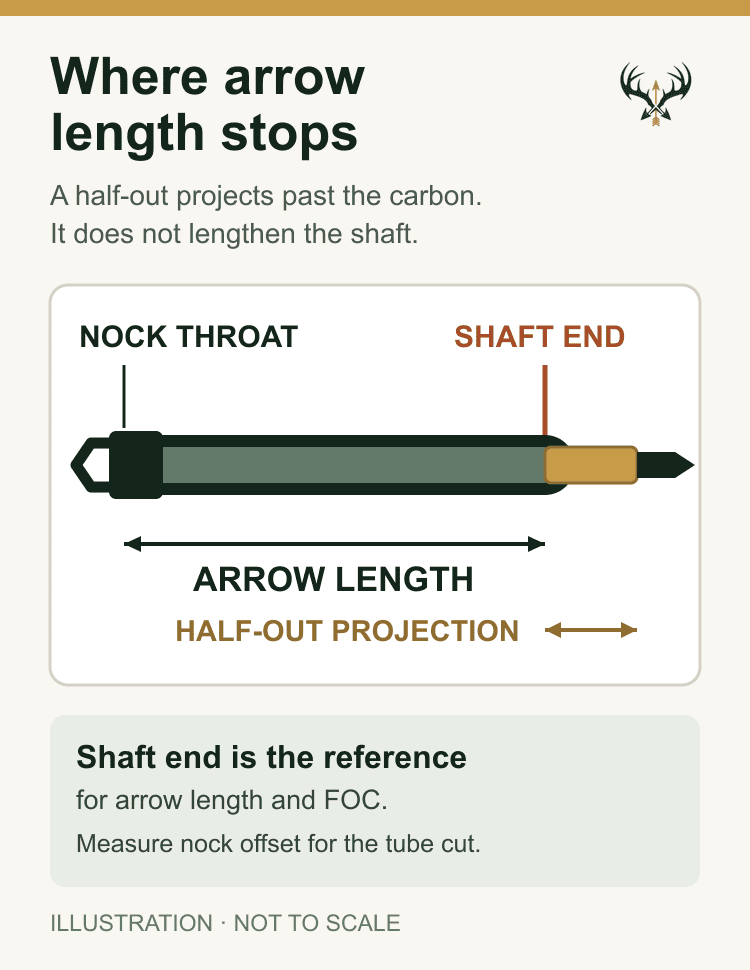
Install the half-out or outsert, then measure from the front end of the shaft to the flat face where the point or broadhead tightens. Enter that distance in Half-out or outsert extension past the shaft. If the insert is flush, enter zero. Enter the full weight of the half-out or outsert in the insert-weight field only once.
For example, if the half-out sticks out 0.5 inch past the shaft, enter 0.5 inch of extension. The calculator places the point weight farther forward in its FOC estimate. It does not add 0.5 inch to shaft length or shaft weight. The weight of the half-out still counts toward total arrow weight and can affect dynamic spine. After building one arrow, balance the complete arrow and use measuring mode to check the estimate. If you are still choosing the shaft cut, start with my arrow-length system and calculator.
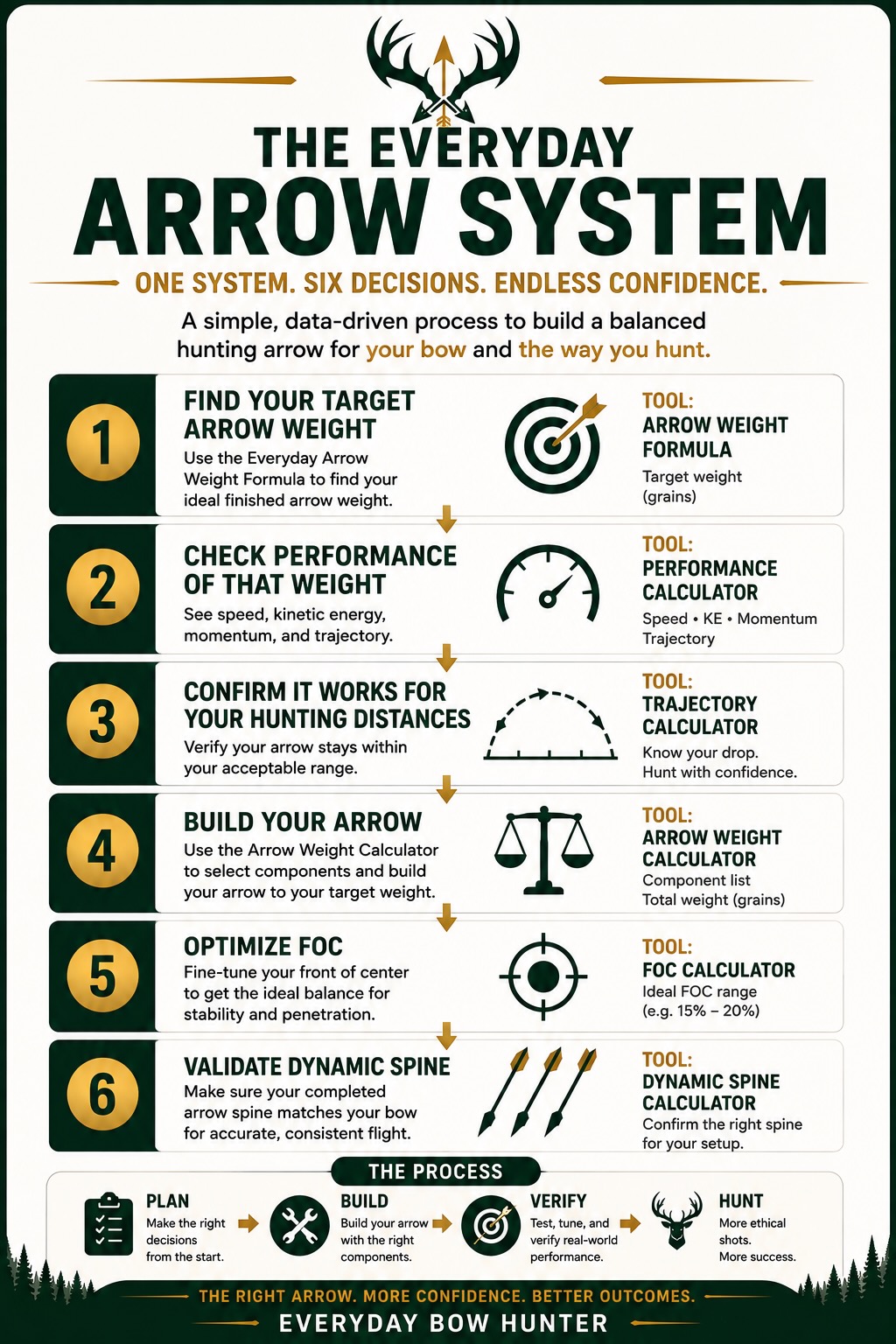
Where this fits: FOC helps you refine the balance of the component plan from Step 4. It does not replace spine selection or tuning. After you choose the front end, use the Dynamic Spine Calculator (Step 6) to check the complete setup before you build the full batch and tune it.
How to Read Your FOC Result
Most hunting-arrow guidance uses 10–15% FOC as a standard range. My preferred working range for the Everyday Arrow System is 13–18%. That range overlaps the common industry guidance but allows a little more front balance when the complete build supports it.
| FOC Result | How to Use the Result |
|---|---|
| Below 10% | Low FOC. Recheck the measurements and review the front and rear component balance. |
| 10% to below 13% | Within standard hunting guidance, but below my preferred 13–18% working range. |
| 13% through 15% | Within both standard industry guidance and the Everyday Arrow System working range. |
| Above 15% through 18% | Within the Everyday Arrow System working range. Confirm finished weight, dynamic spine, and broadhead tune. |
| Above 18% through 20% | Above my preferred working range. Use it deliberately and verify the full set of tradeoffs. |
| Over 20% | High FOC. Treat this as a specialized build and check weight, dynamic spine, trajectory, clearance, and tune carefully. |
FOC is not a grade by itself. More is not always better, and a number inside a preferred range does not replace correct spine or a good tune. It is one part of the complete arrow.
What FOC Means on an Arrow
FOC stands for front of center. It tells you how far the arrow’s balance point sits in front of the physical center of the shaft-length measurement. The answer is shown as a percentage.
An arrow with 15% FOC balances 15% of its measured arrow length forward of center. Two arrows can have the same finished weight and different FOC because their weight is distributed differently.
FOC can affect the way an arrow balances and stabilizes, how the front and rear components work together, and how clearly a tuning problem appears with a broadhead. It does not work alone. Shaft stiffness, arrow length, total front weight, vane control, component alignment, broadhead design, and bow tune still matter.
Target FOC, Estimated FOC, and Measured FOC
Working FOC target
This is the range you choose while planning the arrow. For most Everyday Arrow System builds, I start with 13–18%. A target is not the final measurement; it is a constraint that helps guide shaft length and component choices.
Estimated FOC
Choose Plan an Arrow Before I Build It to estimate FOC from the shaft and component specifications. This helps you see whether the proposed weight distribution is close before permanent assembly. The result is only as accurate as the component weights and positions you enter.
The calculator estimates shaft weight by multiplying shaft length by grains per inch. It then combines the shaft and component weights with their projected positions to estimate finished weight and balance point. Standard mode uses common component locations. Detailed mode lets you enter the center positions for the vanes and wrap when you have better measurements.
The Target FOC Planner estimates how much added front weight would be needed to reach the selected FOC. The comparison shows how 25 grains less and 25 or 50 grains more at the front change finished weight, balance point, and projected FOC. Recheck dynamic spine whenever you change front weight or arrow length.
Measured FOC
Choose Measure an Arrow I Already Have to find FOC from a physical arrow’s balance point. Measure one completed test arrow before committing the full batch when your component system allows it. Never shoot an incompletely installed mock-up, and follow the component maker’s installation instructions.
Final FOC
After permanent assembly, weigh the finished arrow and measure FOC again. Record the final result with the arrow’s spine, measured speed, component list, and tuning notes.
How to Measure Arrow FOC Correctly
Use a complete arrow with the nock, vanes or feathers, wrap, insert system, collar, and intended point installed. If you use a field point instead of the hunting broadhead for this measurement, match the broadhead’s weight.
- Prepare the arrow. Confirm that every installed part is secure and that the field point or broadhead represents the intended finished build.
- Find the balance point. Rest the arrow across a narrow edge and move it until the arrow balances. Mark that point.
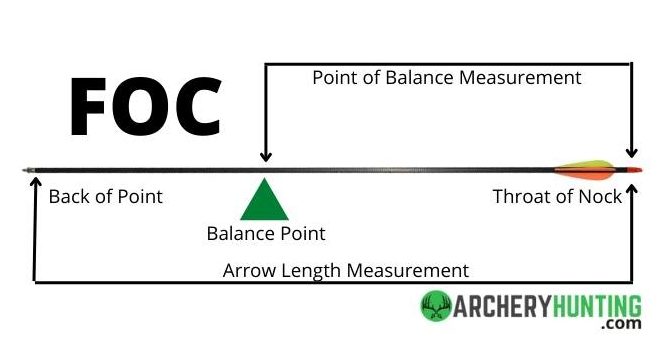
- Measure the balance point. Measure from the throat of the nock to the mark. Enter that number in the calculator.
- Measure arrow length. Measure from the throat of the nock to the end of the shaft. Do not include the point or broadhead. Enter that number in the calculator.
- Record the result. Save the measured FOC with the finished arrow weight and build details.
The Arrow FOC Formula
The calculator uses this formula:
FOC % = ((Balance Point − Arrow Length ÷ 2) ÷ Arrow Length) × 100
For example, a 28-inch arrow with a balance point 18.20 inches from the nock throat has 15% FOC:
((18.20 − 14.00) ÷ 28.00) × 100 = 15%
Weight, FOC, and Dynamic Spine Work Together
The main planning mistake is changing front weight to reach an FOC number without checking what that change does to the rest of the arrow.
- More point, insert, outsert, or collar weight raises finished-arrow weight and usually moves the balance point forward.
- More front weight also weakens the arrow dynamically.
- A longer shaft adds weight and weakens dynamic spine. Its FOC effect depends on the complete weight distribution.
- Heavier vanes, wraps, bushings, and nocks add rear weight and move the balance point back.
That is why the Arrow Weight Calculator, Dynamic Spine Calculator, and FOC Calculator belong in the same planning process. A change that helps one number can move another number the wrong way.
Worked Example: Plan the Target, Then Measure It
This is a planning example, not a recommendation for a specific shaft or component system.
Using the same reference bow as the Formula V2.1 example, a 340-IBO bow set at 27.5 inches and 62 pounds produces a 469-grain target and a 444–494-grain Working Range.
- In planning mode, enter a 28.5-inch arrow length at 9.5 GPI, a 125-grain point, 50-grain insert, 10-grain collar, 10-grain nock, three 6-grain vanes, and an 8-grain wrap. Leave the half-out or outsert extension at zero for this flush-insert example. With the default 0.25-inch nock-groove-to-shaft measurement, the cut shaft is 28.25 inches.
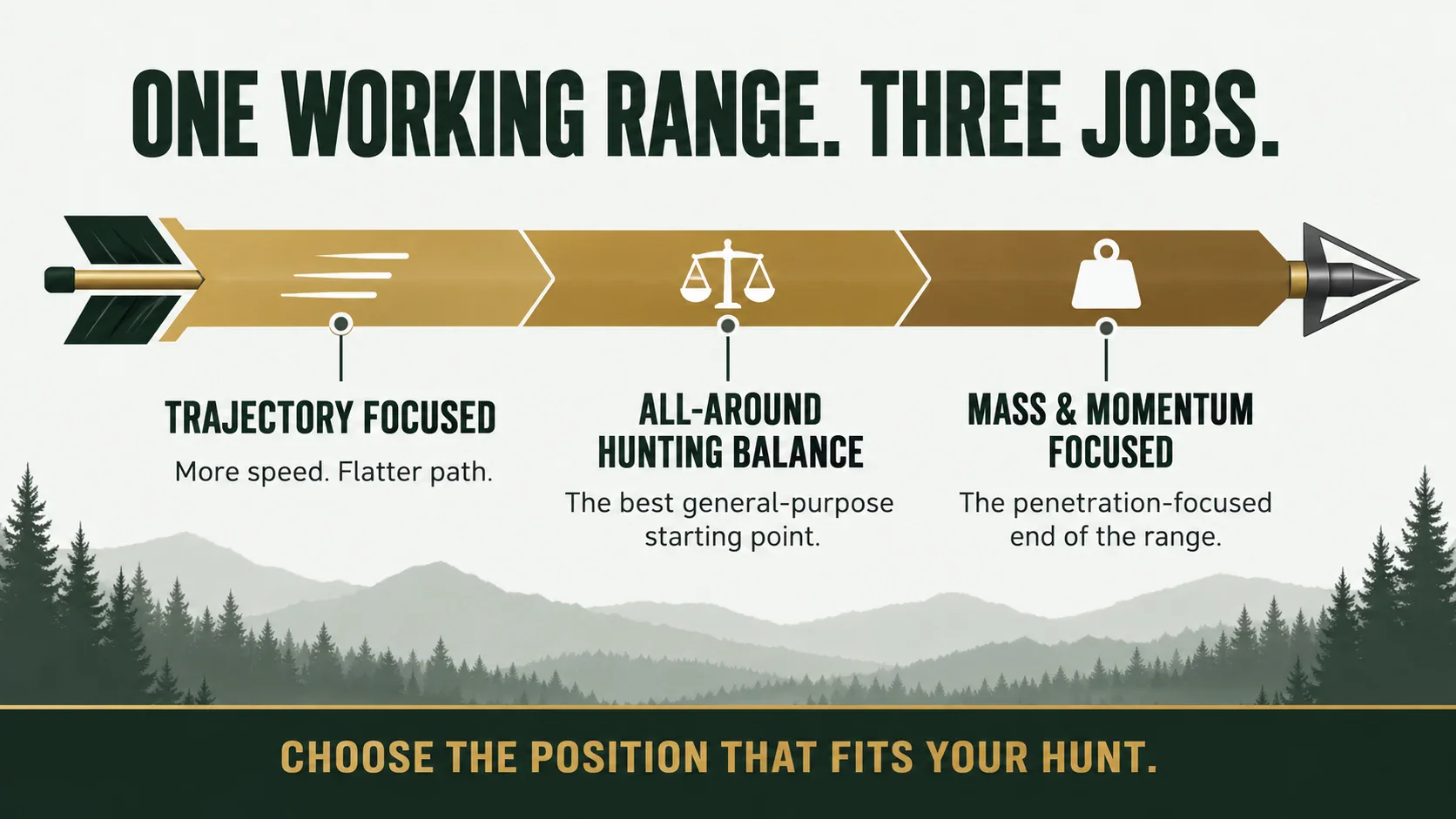
- The calculator projects a 489.4-grain finished arrow with 16.39% FOC. That FOC is inside my 13–18% working range. The finished weight is also inside the Formula range, but it is close to the 494-grain upper edge. This is a Mass and Momentum Focused, penetration-focused plan rather than the all-around Formula Target.
- Add another 25 grains at the point end and the projection moves to 514.4 grains and 18.10% FOC. That result is now 20.4 grains above the Formula Working Range and slightly above my preferred FOC range. The additional front weight also changes Required Spine.
- Do not add weight just to chase a higher FOC number. First decide whether the added total weight, weaker dynamic reaction, trajectory change, and component package still fit the complete build. In this example, the extra 25 grains pushes both weight and FOC beyond the preferred planning ranges.
- Build one safe test arrow. If the completed arrow weighs about 489 grains and balances at 18.920 inches from the nock throat, measuring mode confirms approximately 16.39% FOC.
This is the decision the planner is meant to support. The original build already meets the weight and FOC targets, so there is no reason to add front weight unless the full arrow system benefits from it. The next step is confirming dynamic spine, broadhead clearance, tune, and flight.
Always follow your bow maker’s minimum finished-arrow-weight requirement and the shaft maker’s spine and component guidance.
Frequently Asked Questions
What is a good FOC for a hunting arrow?
Standard industry guidance is commonly 10–15%. My preferred Everyday Arrow System working range is 13–18%. Treat values above 18% through 20% as a deliberate choice and values over 20% as high FOC.
Is more arrow FOC always better?
No. Moving weight forward also changes finished weight and dynamic spine. The right result is the one that fits the complete build and produces safe, repeatable arrow flight.
Do I include the broadhead in the arrow-length measurement?
No. Measure arrow length from the throat of the nock to the end of the shaft. Do not include the point or broadhead in that length.
Should the broadhead be installed when I find the balance point?
Use the intended finished components for the best measurement. A field point may be used when it matches the intended broadhead’s weight.
Can this calculator predict FOC before I build the arrow?
Yes. Choose Plan an Arrow Before I Build It, then enter the shaft length, grains per inch, and proposed component weights. The calculator estimates finished weight, balance point, and FOC, then lets you compare nearby front-weight options. Use that result to plan the build, then measure the completed test arrow before finishing the full batch.
What changes arrow FOC the most?
Point, insert, outsert, collar, and added front weight usually make the biggest direct changes. Heavier nocks, vanes, and wraps move the balance point rearward and reduce FOC. Shaft length and GPI also change how the complete arrow balances, which is why every component belongs in the plan.
Does adding front weight change dynamic spine?
Yes. More point, insert, or outsert weight makes the shaft react dynamically weaker. Recheck shaft selection and tune whenever you make a meaningful change to front weight or arrow length.
When should I measure FOC?
Set the target during component planning. Measure a test arrow before building the full batch when possible, and measure the finished arrow again after permanent assembly.
FOC is most useful when it helps you make a better build decision. Set the target early, measure the real arrow, and let the complete setup—not one number—decide whether the build is ready.
Stay lethal,
– Mike
CONTINUE THE ARROW SYSTEM
Your Next Steps
🧭 Start with the Hunting Arrow Planner
Use the guided path to carry one build through arrow length, target weight, performance, components, FOC, and dynamic spine.
You have a working FOC target or a measured result. Now make sure it fits the rest of the arrow.
🎯 Set Your Formula Target
Start with the finished-arrow target and working range for your bow.
📊 Compare Arrow Performance
Compare the target with nearby finished-arrow weights before choosing the final plan.
⚖️ Plan the Component Weight
Add the shaft and every part while keeping the working FOC target in view.
🏹 Check Dynamic Spine
Recheck the shaft after you change arrow length or front weight.
🔧 Follow the Arrow Build Guide
Build one test arrow, verify the numbers, complete the batch, and tune the final setup.
🏹 Part of the Everyday Arrow System
Plan weight, FOC, and spine together. Then measure, tune, and confirm the finished arrow.
Want to see exactly what I’m carrying this season? Check out my Personal Bowhunting Gear List for 2026